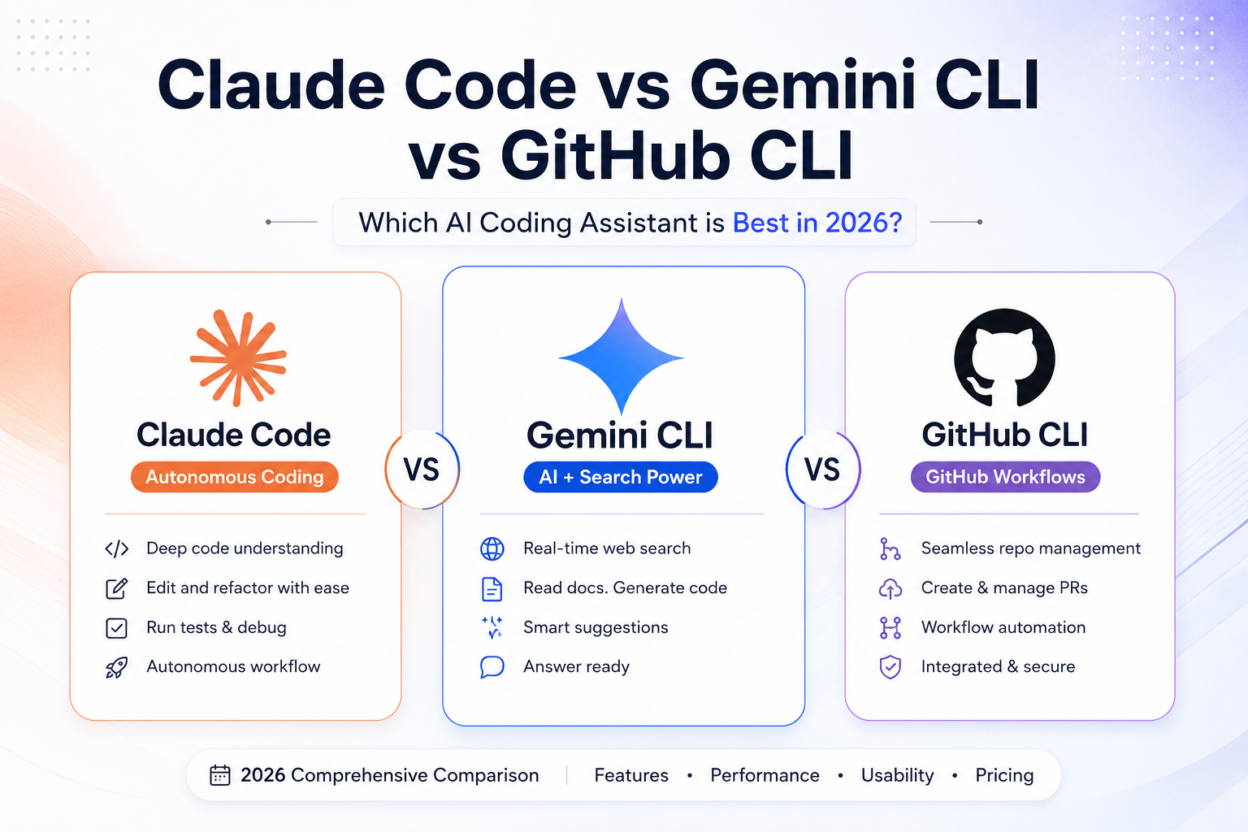
Claude Code vs Gemini CLI vs GitHub Copilot CLI is one of the most common questions developers are asking in 2026.
AI coding tools have evolved far beyond autocomplete. Modern coding assistants can understand entire repositories, refactor code across multiple files, run terminal commands, debug failing tests, create pull requests, and even complete development tasks with minimal supervision.
The challenge isn’t finding an AI coding tool anymore.
It’s choosing the right one.
Claude Code, Gemini CLI, and GitHub Copilot CLI all solve different problems, and picking the wrong tool can slow down your workflow instead of accelerating it.
This guide compares all three across coding performance, automation, context handling, MCP support, pricing, GitHub integration, and real-world development workflows.
Quick Verdict
Don’t want to read the full comparison?
Here’s the short version:
✅ Best Overall AI Coding Assistant: Claude Code
✅ Best Free AI CLI: Gemini CLI
✅ Best for GitHub Workflows: GitHub Copilot CLI
✅ Best for Large Codebases: Claude Code
✅ Best for Learning & Research: Gemini CLI
✅ Best for Enterprise Teams: Claude Code
If you’re building software professionally, Claude Code is currently the strongest all-around option.
If you want the best free experience, Gemini CLI delivers exceptional value.
If most of your day revolves around GitHub repositories, pull requests, and CI/CD pipelines, GitHub Copilot CLI remains the most practical choice.
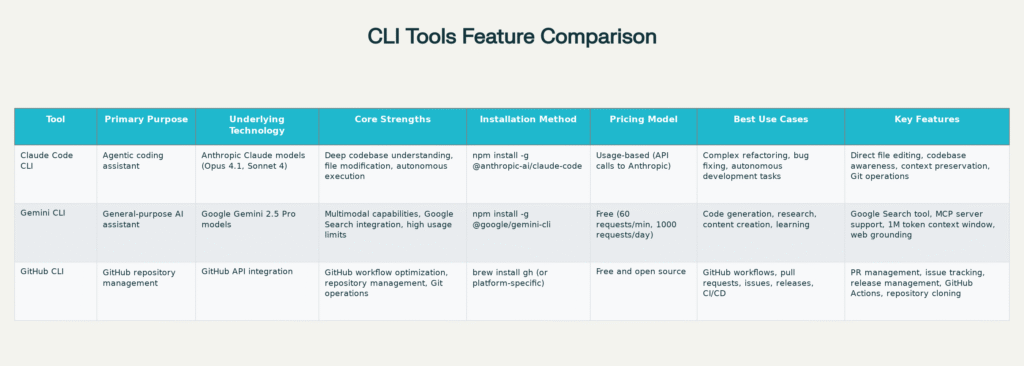
Claude Code vs Gemini CLI vs GitHub Copilot CLI: Comparison Table
| Feature | Claude Code | Gemini CLI | GitHub Copilot CLI |
|---|---|---|---|
| Best For | Autonomous coding | Research & learning | GitHub workflows |
| Repository Awareness | Excellent | Good | Good |
| Multi-file Refactoring | Excellent | Good | Limited |
| Agent Workflows | Excellent | Good | Limited |
| MCP Support | Excellent | Excellent | Growing |
| Web Search Integration | No | Native | Limited |
| Git Operations | Excellent | Basic | Native |
| Enterprise Adoption | High | Medium | Very High |
| Free Tier | No | Yes | Limited |
| Learning Curve | Moderate | Easy | Easy |
Claude Code: The Best Choice for Professional Developers
Claude Code feels less like a chatbot and more like a software engineer working beside you.
Instead of answering isolated questions, it understands entire repositories, follows project conventions, updates multiple files, runs commands, and executes complex development workflows with surprisingly little guidance.
For professional developers, this is where Claude Code separates itself from most competitors.
What Claude Code Does Best
- Large-scale refactoring
- Multi-file feature implementation
- Debugging complex applications
- Writing and fixing tests
- Architecture reviews
- Git workflows
- Autonomous coding tasks
A typical prompt might be:
“Add role-based authentication to this SaaS application and update all affected API routes.”
Claude Code can analyze the repository, identify impacted files, update business logic, modify tests, and prepare commits with minimal back-and-forth.
Who Should Choose Claude Code?
Claude Code is ideal if:
- You work on production systems
- You manage large repositories
- You need autonomous execution
- You want maximum coding productivity
For serious software development, Claude Code currently sets the benchmark.
Gemini CLI: The Best Free AI CLI for Developers
Gemini CLI approaches AI development from a different angle.
Instead of focusing exclusively on coding, it combines development assistance with research, documentation analysis, and large-context reasoning.
The biggest advantage is context.
Gemini can process enormous amounts of information while also leveraging Google’s search ecosystem, making it particularly useful when you’re learning unfamiliar technologies or investigating complex problems.
What Gemini CLI Does Best
- Research-heavy development
- Documentation analysis
- Learning new frameworks
- Architecture exploration
- Large-context reasoning
- Technical content generation
If you’re learning Kubernetes, Rust, AI engineering, or a new framework, Gemini CLI often provides more useful context than traditional coding assistants.
Who Should Choose Gemini CLI?
Gemini CLI is ideal if:
- You want a powerful free tool
- You frequently learn new technologies
- You work with large documentation sets
- You need massive context windows
For students, solo developers, and engineers doing significant research work, Gemini CLI offers excellent value.
GitHub Copilot CLI: The Best Tool for GitHub-Centric Workflows
GitHub Copilot CLI isn’t trying to replace your coding environment.
Instead, it focuses on making GitHub workflows faster and more efficient.
If your day involves pull requests, repository management, issue tracking, releases, and CI/CD pipelines, GitHub Copilot CLI can eliminate a surprising amount of repetitive work.
What GitHub Copilot CLI Does Best
- Pull request management
- Repository administration
- Issue tracking
- GitHub Actions workflows
- Release management
- DevOps operations
Rather than jumping between the terminal and browser, developers can manage GitHub workflows directly from the command line.
Who Should Choose GitHub Copilot CLI?
GitHub Copilot CLI is ideal if:
- You spend most of your time on GitHub
- You manage multiple repositories
- You work heavily with pull requests
- You maintain CI/CD pipelines
For GitHub-focused teams, it’s one of the easiest productivity wins available.
Which Tool Wins in Real-World Scenarios?
Building a SaaS Application
🏆 Winner: Claude Code
Large applications require coordinated changes across backend services, databases, APIs, authentication systems, and tests.
Claude Code’s repository awareness makes it the strongest option.
Learning a New Framework
🏆 Winner: Gemini CLI
Its research capabilities and large context window make it the better learning companion.
Managing Open Source Projects
🏆 Winner: GitHub Copilot CLI
Repository management, pull requests, releases, and issue workflows are native strengths.
Refactoring a Legacy Codebase
🏆 Winner: Claude Code
Multi-file refactoring remains one of the hardest software engineering tasks.
Claude Code consistently performs best here.
Should You Use More Than One AI CLI?
Probably.
Many experienced developers now use a hybrid workflow:
- Claude Code for coding and implementation
- Gemini CLI for research and documentation
- GitHub Copilot CLI for repository management
These tools often complement each other better than they compete.
Using the right tool for the right task typically produces better results than forcing one assistant to handle everything.
Final Verdict
If you can only choose one AI coding assistant today, choose Claude Code.
It delivers the strongest combination of coding performance, repository understanding, automation, and autonomous execution.
Choose Gemini CLI if your priorities are learning, research, documentation, and free access.
Choose GitHub Copilot CLI if GitHub workflows dominate your daily work.
The most productive developers in 2026 aren’t replacing themselves with AI.
They’re removing repetitive work, accelerating development cycles, and spending more time solving meaningful engineering problems.
The right AI CLI helps you do exactly that.