Introduction
The cost of staying competitive as a software developer is quietly skyrocketing. Between paying for premium IDE wrappers, shelling out monthly subscription fees for proprietary large language models (LLMs), and watching your API token usage stack up during a complex multi-file refactoring session, “vibe coding” isn’t cheap.
When Anthropic launched Claude Code, it redefined terminal-based autonomous engineering. However, for independent developers, students, and boot-strapped startup founders, running an autonomous agent that consumes high-cost Claude 3.5 Sonnet or Claude 4 tokens directly from the CLI can easily rack up a massive bill in a single afternoon.
Enter the Freebuff AI Coding Agent.
Positioning itself as a completely free, unlimited alternative to paid terminal agents, Freebuff has quickly caught the attention of the developer community. But when an AI tool promises unlimited, high-tier multi-agent operations without asking for a credit card or an API key, skepticism is a healthy engineering response.
We put Freebuff through its paces at the RankLLMs testing sandbox. We ran it through structural codebase indexing, complex cross-file debugging, and frontend boilerplate generation to see if a zero-cost terminal agent can genuinely compete with premium developer platforms. Here is our definitive, unfiltered technical review.
What Is the Freebuff AI Coding Agent?
Freebuff is a lightweight, terminal-native autonomous AI coding agent designed to operate directly within your local file system. Born as a friction-free, ad-supported offshoot of the premium Codebuff ecosystem, Freebuff eliminates the onboarding walls that plague modern AI tools—namely billing configuration, seat licenses, and API keys.
It installs globally via a single package manager command and interacts with your codebase by spinning up a multi-agent framework. Instead of functioning as a passive autocomplete box inside your code editor, Freebuff works like a junior engineer sitting at a secondary terminal. It reads your files, maps your project structure, executes terminal tasks, and performs surgical code edits based on natural language instructions.
Why Developers Are Talking About Freebuff in 2026
The primary driver behind the Freebuff hype cycle is financial relief without a massive drop-off in intelligence. In the current ecosystem, developers are caught between two paradigms:
-
High-Friction Open-Source Setups: Using extensions like Cline or Roo Code paired with local models (like Qwen 2.5 Coder via Ollama) or cost-effective third-party API proxies (like OpenRouter). This is highly private and inexpensive, but requires constant maintenance, configuration tinkering, and robust local hardware.
-
Expensive Proprietary Ecosystems: Relying on tools like Claude Code, Cursor Composer, or Windsurf. These tools offer incredible reasoning and polished UX but come bound to a $20-to-$50 monthly subscription or direct, high-cost metered token consumption.
Freebuff attempts to bridge this gap. It provides a highly optimized, out-of-the-box multi-agent terminal workflow that handles the heavy lifting of context management and file editing completely free of charge. By utilizing advanced open-source and commercial models tailored for localized operations, it removes financial anxiety from autonomous agent execution.
Key Features Under the Hood
To evaluate Freebuff, you have to look beyond the “free” marketing label and analyze its underlying engine. Here are the core mechanics driving its workflow:
1. The Multi-Model Backend
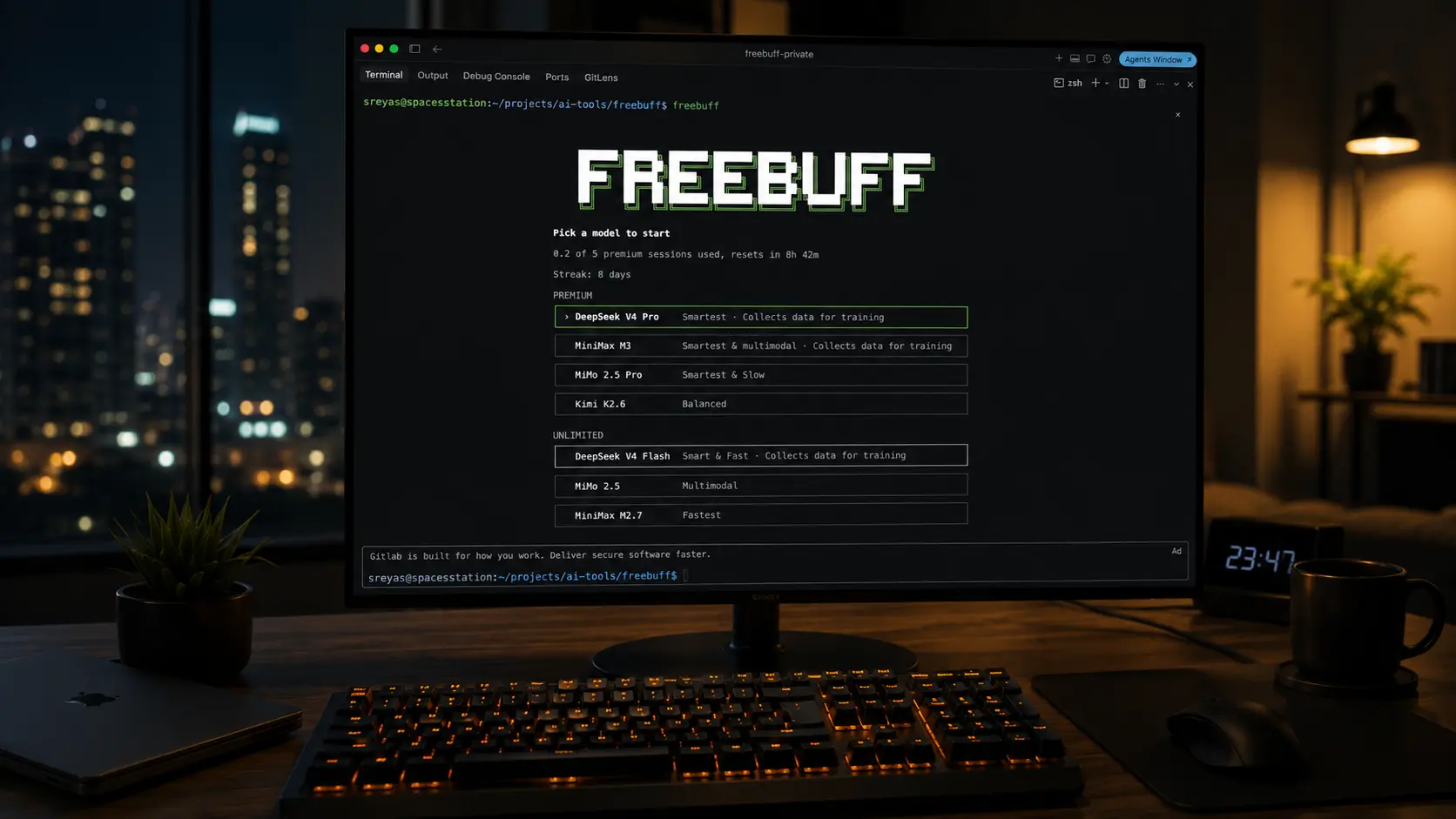
Freebuff doesn’t rely on a single static model. Instead, it hooks into an ad-supported, cloud-hosted infrastructure that grants users access to high-performance reasoning and flash models. During our testing, we observed seamless integration with models like DeepSeek V4 Pro, DeepSeek V4 Flash, and Mimo 2.5 Pro. By offloading the inference to these models, Freebuff handles complex algorithmic logic, cross-file architectural changes, and rapid text generation without choking local machine resources.
2. Immediate Codebase Indexing
One of Freebuff’s standout features is its speed. It implements a rapid repository ingestion system that maps project directories, parses file symbols, and tracks internal dependencies in seconds. It builds an in-memory context graph of your workspace, allowing the agent to perform pinpoint edits across disjointed files (e.g., updating a database schema in your backend and instantly propagating that change to your frontend types) without burning precious time or bloating your token context windows.
3. Native Sub-Agent Architecture
When you issue a prompt to Freebuff, it doesn’t just pass the string to a raw completion endpoint. It routes your request through an orchestration layer that spins up specialized sub-agents. A Deep Reasoning Agent takes charge of tracing bugs and formulating architectural plans, while separate context-aware File-Writing Agents execute targeted diffs on your workspace.
The Competitive Landscape: Freebuff vs. The Giants
How does Freebuff stack up against the most prominent AI coding tools on the market? To find out, we compared its architecture, pricing model, and deployment style side-by-side with the industry standard.
Freebuff vs. Claude Code
Claude Code is Anthropic’s official CLI darling. Powered by the Claude ecosystem, its reasoning capabilities, test-running precision, and terminal orchestration are unparalleled.
-
The Reality Check: Claude Code connects directly to your Anthropic console account or requires standard commercial billing. If you let it run wild debugging an asynchronous loop, it can rack up bills quickly by constantly re-reading entire codebases.
-
The Verdict: Freebuff cannot completely match Claude’s high-end, edge-case architectural reasoning. However, for daily feature building, boilerplate generation, and rapid refactoring, Freebuff delivers comparable, highly actionable outputs without costing a dime.
Freebuff vs. Cursor & Windsurf
Cursor and Windsurf are full-blown, deeply integrated forks of VS Code. They excel at inline generation, chat sidebars, and multi-file “Composer” or “Cascade” sessions with premium UX.
-
The Reality Check: Freebuff is completely editor-agnostic. It runs in your terminal, whether you use VS Code, Neovim, Zed, or Emacs. Furthermore, community-driven community bridges (such as local OpenAI-compatible proxies) even allow developers to pipe Freebuff’s backend models right back into tools like GitHub Copilot Chat.
-
The Verdict: If you want a visual, deeply embedded IDE environment, Cursor remains the gold standard. If you prefer a lightweight terminal agent that leaves your editor clean and unburdened, Freebuff has the upper hand.
Freebuff vs. Cline & Roo Code
Cline (formerly Prevail NY) and Roo Code are incredibly popular VS Code extensions that turn your editor into an autonomous agent sandbox.
-
The Reality Check: Cline puts total control in your hands. You plug in your own OpenRouter, Anthropic, or Ollama API keys. You configure the system prompts, control permissions, and pay exactly what the tokens cost. Freebuff eliminates this entire configuration step. It is an install-and-go solution.
-
The Verdict: Cline is built for power-users who want complete granular control over their API endpoints and system instructions. Freebuff is designed for developers who want immediate agent execution without acting as an infrastructure administrator.
Comparison Matrix
| Feature / Metric | Freebuff AI Coding Agent | Claude Code | Cursor (Pro) | Cline / Roo Code | Aider |
| Interface | CLI / Terminal | CLI / Terminal | Forked IDE (VS Code) | VS Code Extension | CLI / Terminal |
| Primary Pricing | 100% Free (Ad-Supported) | Metered API Token Usage | $20/month Subscription | User-Provided API Keys | User-Provided API Keys |
| Setup Friction | Zero (NPM Global Install) | Medium (Anthropic Auth) | Low (App Install) | Medium (Key Configuration) | Medium (Git & Key Setup) |
| Codebase Mapping | Automatic (In-Memory) | Automatic (Agent-Led) | Deep Vector Indexing | User/Agent Controlled | Git-Repo Map Analytics |
| Model Access | DeepSeek V4, Mimo 2.5 | Claude Ecosystem | Custom GPT-4o/Claude | Any OpenAI/Anthropic/Local | Any OpenAI/Anthropic/Local |
Real-World Use Cases: Where Freebuff Shines
We wanted to push Freebuff past basic “Hello World” examples. We opened up a medium-sized project containing a Next.js frontend, a Python FastAPI backend, and an isolated SQLite configuration to see how it performs in production-like situations.
Rapid Prototyping and Boilerplate Generation
If you need to quickly spin up a responsive UI component using modern UI and animation libraries like Tailwind CSS and GSAP, Freebuff handles it flawlessly. By prompting the agent in your terminal, it writes the code, structures the directory cleanly, and creates modular, reusable structures.
Repetitive Cross-File Refactoring
We instructed Freebuff to migrate an existing local authentication mock setup over to a rigorous, structured validation layer. The agent successfully read the context across multiple files, identified where the types were imported, updated the validation definitions, and edited the corresponding API routes without manual intervention.
Automated Test Generation
By point-blank pointing Freebuff to an isolated utility library, its multi-agent system systematically generated a suite of unit tests, handling basic edge cases and input sanitization mocks without breaking existing code paths.
Advantages: Why You Might Switch
-
Unrestricted Access to Leading Open Models: Having direct, unmetered access to advanced developer models like DeepSeek V4 Pro without managing local weights or configurations is an incredible workflow boost.
-
Minimalist, Zero-Config Onboarding: No configuration dashboards, no payment setup, and no complex settings files. You run an installation command, authenticate with GitHub, and immediately start engineering.
-
True Editor Agility: Because it resides natively within the terminal interface, it respects your existing workflow choices. It adapts perfectly whether you are writing code in a fully customized Neovim environment or a stock instance of VS Code.
-
Highly Surgical Diffs: It rarely suffers from the “lazy model” syndrome of deleting large swaths of text or overwriting code blocks with generic comments. It targets specific lines and inserts precise code modifications.
Limitations: The Catch You Need to Know
No piece of software is magic, and a free tool always comes with specific trade-offs. Here is where Freebuff runs into friction:
-
The Ad-Supported CLI Trade-off: Freebuff maintains its free ecosystem by printing brief, non-intrusive text-based advertisements at the bottom of the terminal output. While it doesn’t interrupt your typing or inject code into your codebase, it can feel jarring if you are accustomed to completely clean, premium corporate environments.
-
Geographic Availability Restrictions: The cloud infrastructure powering Freebuff’s high-tier free access is region-locked. It currently optimizes distribution across select regions, including the United States, Canada, the United Kingdom, and Australia. Users operating outside these zones might face intermittent connectivity or reduced performance.
-
Lack of Deep Sandboxed Execution: Unlike heavyweight tools that can spin up isolated Docker containers to execute code, run linting checks, and handle visual browser debugging natively, Freebuff operates primarily as an analytical write-and-edit agent. You still need to manually verify execution and run your own local test suites.
Who Should (and Shouldn’t) Use Freebuff?
Who It Is For:
-
Students & Lifelong Learners: If you are learning web development, building portfolio pieces, or exploring software engineering without a massive learning budget, Freebuff is an absolute game-changer.
-
Indie Hackers & Bootstrappers: If you are managing your runway carefully and want a reliable secondary agent to handle boilerplate and multi-file edits without incurring variable API costs, this tool fits the bill perfectly.
-
Terminal Purists: Developers who refuse to leave their highly optimized CLI or terminal-based text editors will appreciate how cleanly Freebuff integrates into their workflows.
Who It Is NOT For:
-
Enterprise Environments with Strict Data Privacy Guidelines: If you are working on proprietary corporate codebases covered by rigorous NDAs or strict compliance regulations, routing your local codebase context through a free, ad-supported proxy network is a security non-starter. You should stick to self-hosted local models via Cline or enterprise-tier instances of Cursor.
-
Developers Seeking Total Autonomy: If you want an agent that can autonomously run a server, read the terminal errors, look at visual screenshots of your frontend, and fix its own mistakes recursively for an hour, you will outgrow Freebuff quickly.
Is Freebuff Really Free? Decoding the Business Model
It is a core axiom of the modern tech world: If you aren’t paying for the product, you are the product. How does Freebuff sustain the massive server cost of hosting inference for models like DeepSeek V4 and Mimo 2.5?
The answer lies in its monetization strategy: Terminal-native developer advertising.
Freebuff serves targeted text ads directly within the command-line stream. These are typically highly curated placements aimed explicitly at software engineers—think developer tool sponsorships, cloud hosting credits, and remote job boards. Additionally, Freebuff acts as a highly effective funnel for its parent platform, Codebuff, giving users a clear path to upgrade to dedicated, ad-free, high-throughput enterprise infrastructure when their commercial needs scale up.
Your local codebase is read and indexed locally to build context, meaning your raw source code files aren’t being scraped or packaged into data products, though your active prompt strings are processed by their cloud-hosted inference nodes.
Final Verdict
The Freebuff AI Coding Agent is a highly capable tool that challenges the assumption that effective AI development tools must require a paid subscription. It strips away the complex pricing tiers and configuration hurdles of the modern AI ecosystem, providing developers with a fast, reliable terminal agent.
It isn’t a flawless replacement for the pure architectural reasoning of Claude Code, nor does it match the deep feature set of Cursor’s visual ecosystem. But as a fast, accessible, and completely free terminal companion for everyday coding, bug hunting, and boilerplate generation, Freebuff delivers outstanding performance.
If you are looking to cut down your monthly software expenses without sacrificing the raw power of multi-agent development, Freebuff is absolutely worth an execution run in your workspace.
Frequently Asked Questions (FAQ)
How do I install the Freebuff AI Coding Agent?
Freebuff installs globally via the Node Package Manager (NPM). Simply open your terminal and run the following command:
npm install -g freebuff
Once installed, navigate to your project directory and execute the agent to initialize your workspace.
What models does Freebuff use under the hood?
Freebuff leverages a diverse suite of high-performance models, primarily utilizing DeepSeek V4 Pro, DeepSeek V4 Flash, and Mimo 2.5 Pro to handle reasoning, contextual codebase understanding, and fast code edits.
Is my source code safe and private with Freebuff?
Freebuff indexes your project structure and maps dependencies locally on your machine to save time and optimize context. However, because it relies on a cloud-hosted infrastructure for inference, your prompt strings and relevant code snippets are processed through their servers. It is highly recommended to avoid using it on enterprise or proprietary corporate code codebases with strict compliance frameworks.
Does Freebuff require a GitHub account to function?
Yes. Freebuff utilizes GitHub OAuth to securely authenticate users, manage daily usage quotas fairly, and minimize bot abuse across its ad-supported infrastructure.
Source Links (Authority References via Rankllms)
-
Codebuff GitHub repository: ->
[https://github.com/CodebuffAI/codebuff](https://github.com/CodebuffAI/codebuff) -
Freebuff official website: ->
[https://freebuff.com/](https://freebuff.com/)